Choose your template colour

Latest Templates
Tampilkan postingan dengan label 3 Columns. Tampilkan semua postingan

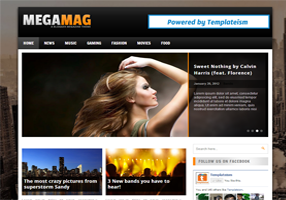
MegaMag Blogger Template

Senin, 15 April 2013

MegaMag Blogger Template
Template Name: MegaMag Blogger Template
Platform: Blogger / Blogspot
Release date : 20, January 2013
Author : www.templateism.com
License : Creative Commons Attribution 3.0

Download Preview


MegaMag is a robust multipurpose magazine Blogger Template. With its Flexible coding, the theme can be molded to fit your desire needs whether it is a personal blog or a high scale magazine style Professional website. It has rich functionalities like Multi Level Drop down Menu, Nivo Slider and much more high quality stuff. It has all the spicy features which are required to run a successful blog or website. This theme is ideal for Technology, Fashion, Business, Gaming, Music, and Girly websites.

MegaMag Blogger Template Big Preview

Features of MegaMag Blogger Template:

  1. Multi-Level Drop Down Menu: The most significant feature of this template is its multi-level Drop down menu that works quite brilliantly. The jQuery used to create the drop down effect is extremely modest and hardly takes seconds to load. 

  2. Nivo Featured Slider: Blogger Templates are not renounced for Nivo Sliders. Therefore, to remove that misconception we have included a Nivo Slider which has same extraordinary transection effects.  Your visitors would adore playing with the sliders. 

  3. 2 Column Post Display on Home/Static Pages: Unlike, other Blogger Template, this theme has 2 column post displays on static and home page. It means two different articles would display in 2 columns one after another. If anyone is confused then, he can view the DEMO to remove his confusion.

  4. Static Homepage: The Home page of this theme is static. Thus, the Slider and few more gadgets would only appear on the homepage so it may not interest the user-friendly experience of your visitors.  

  5. Highly SEO Friendly: It is not just a SEO Friendly theme because it is highly optimized for Search engines. Unlike our other themes, we have integrated some advance techniques that would surely bring some more traffic on your website. 
More Features:  Ads Ready, WordPress Look, Web 2.0, Magazine Style, Static Home page, Fixed Width, Orange and Black color Scheme, threaded commenting system, 4 columns footer and much more.

How To Customizing Drop Down Menu?

Go To Blogger.com >> Template >> Edit HTML >> Proceed. Now search for the following coding in the template. After finding it Replace # with your URLs and Save the template.
<!-- Drop Down Menu -->
<div id='navigation-wrapper'>
     <div class='container'>
            <ul class='menu' id='navigation'>
<li class='current-menu-item'><a href='#'>Home</a>
<ul class='sub-menu'>
<li><a href='#'>Full Width Slider 2</a></li>
<li><a href='#'>Compact w/thumbnails</a></li>
  </ul>
     </li>

<li><a href='#'>News</a></li>
<li><a href='#'>Music</a></li>
<li><a href='#'>Gaming</a></li>
<li><a href='#'>Fashion</a></li>
<li><a href='#'>Movies</a></li>

<li><a href='#'>Food</a>
<ul class='sub-menu'>
<li><a href='#'>Apple</a></li>
<li><a href='#'>Fruits</a></li>
</ul>
   </li>
      </ul>

<select id='navigation_select'>
   </select>
        </div>
              </div>
<div style='clear:both;'></div>

How to Add Widget or Ads Above/Below Posts:

Go To Blogger.com >> Template >> Edit HTML >> Proceed and Search for the Following coding.

To Show Below Post Title:
<b:if cond='data:blog.pageType == &quot;item&quot;'>
<!--Google Adsense Ad Code (Below Post Title)-->
</b:if>
To Show at the End of Posts
<b:if cond='data:blog.pageType == &quot;item&quot;'>
<!--Google Adsense Ad Code (At the End of Posts)-->
</b:if> 
Replace: 
<!--Google Adsense Ad Code (Below Post Title)--> To Show widget Below Post Title.
<!--Google Adsense Ad Code (At the End of Posts)--> To display Widget at the end of posts.
From The Editor's Desk:

This Theme is extremely lightweight and has Google Page Speed of 92 which is ideal for Search engines. Don't forget we have used many jQuery files and still 92 Page Speed score is even more than acceptable. Do not forget to share your experience.

MaxMag Responsive Blogger Template

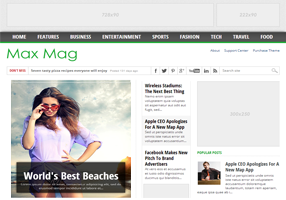
Max Mag Blogger Template
Template Name: MaxMag Blogger Template
Platform: Blogger / Blogspot
Release date : 3, February 2013
Author : www.templateism.com
License : Creative Commons Attribution 3.0

Download Preview


Max Mag is a featured-rich, multimedia and magazine theme. Max Mag is a fully responsive template that has unlimited color scheme with a “Sticky” Menu that scrolls throughout the site. Furthermore, it has many features spots for content as well as Advertisements. All-in-all it is a must-to-have theme that literally takes shape of any kind of a website belonging to any category or niche. The color scheme of the template is also eye friendly and would fresh the thoughts of your readers.
MaxMag Responsive Blogger Template

Features of Max Mag Blogger Template:

  1. Sticky Multi Drop Down Menu: In previously released themes like Dazzling Designer, we utilized “Sticky” drop down menu, but a lot of users demanded for a Multi Drop Down menu which could work on three different sub levels. Keeping that in mind, we have added a “Sticky”, Multi-level Drop down menu in this theme. 

  2. Featured Content Area: This new feature is one of its kinds because we have first time added a splendid widget. This Widget fetches the Posts though Labels and, displays them in the featured content area. 

  3. Featured Ads Spot:Though, we have always experimented while allocating the featured advertisement spots but this time we have selected the most appropriate locations. We did a research work over the areas which are highly viewed by users. As a result, the theme spots were decided. 

  4. Author Bio Widget: The next new thing, which we have added in the template, is the “Author Bio” widget that appears in each and every post. Anyone can customize it, according to their needs. Keep in mind it is not for multiple authors. 
More Features: Adapted from WordPress, Magazine Style, Fixed Width, white and green color Scheme, threaded commenting system, related posts, Ads ready, SEO Friendly and much more.

How To Customizing Sticky Menu?

Go To Blogger.com >> Template >> Edit HTML >> Proceed. Now search for the following coding in the template. After finding it Replace # with your URLs and Save the template.
<div id='nav'>
<div id='main-nav-wrapper'>
<div id='main-nav'>
<div class='menu-main-nav-container'><ul><li><a href='#'>Home</a></li>
<li><a href='#'>Features</a>
<ul class='sub-menu'>
<li><a href='#'>Shortcodes</a></li>
<li><a href='#'>Slideshow</a></li>
<li><a href='#'>Wallpaper Ad</a></li>
<li><a href='#'>Full Width Page</a></li>
<li><a href='#'>Archives Page</a></li>
<li><a href='#'>Homepage Blog</a></li>
<li><a href='#'>No Leaderboard</a></li>
<li><a href='#'>Typography</a></li>
</ul>
</li>
</ul></div></div>
</div><!--nav-mobi-->
</div><!--main-nav-wrapper-->
<!-- Navigation Starts -->

How To Customize the Ticker? 

In the Template coding, search for the following or a similar coding. Since, the customization is extremely straightforward. Therefore, users can customize it without facing any problem whatsoever. Remember: Replace all text which is Blue in color.
<div id='ticker'>
<span class='ticker-heading'>Don't miss</span>
<ul class='ticker-list'>
<li><a href='#'>Fashion For Grown Ups at Rue du Mail</a><span class='ticker-date'>Posted 125 days ago</span></li>
</ul>
</div><!--ticker-->

How to Customize Featured Slider? 

From the template coding search for the following and customize it as it is required. Remember: Replace the text in Yellow. Also replace links in Red with the images that you want to see in the featured jQuery slider.
<!-- Featured Content Slider Started -->
<div id='home-left'>
<div id='featured-container'>
<div class='flexslider'>
<ul class='slides'>

<!-- Slider Wrapper 1 -->

<li>
<a href='#' rel='bookmark' title='The most desirable beaches in the world'><img alt='beach' class='attachment-slider-thumb wp-post-image' height='470' src='https://blogger.googleusercontent.com/img/b/R29vZ2xl/AVvXsEh4AXgU-GXq3O73swpJZyFuQMFniToXhPLjuFOpn5QeWK8EYiS3GY1ROa4kXy5OrA9Z2RzrcOFJUZinYQ54ygZmm4jwcJF8T8XWvkvd5GQeSCpibld0Gyi0wen23IK_s2cbCLzEoHB3RY6m/s1600/beach.jpg' width='420'/></a>
<div class='featured-box'>
<h2><a href='#'>World's best beaches</a></h2>
<p>Lorem ipsum dolor sit amet, consectetur adipisicing elit, sed do eiusmod tempor incididunt ut labore et...</p>
</div><!--featured-box-->
</li>
</div><!--featured-box-->
</ul>
</div><!--flexslider-->
</div><!---featured-container-->

How to Customize Featured Content Area? 

Probably, the easiest way of customizing the Featured Posts are is to add your Labels to the following Coding. In the Template look for the following or similar coding. Replace "Tech" with your Labels. Remember: The spelling should be accurate otherwise it would not work, even take care of upper and lower class letters.
<script type='text/javascript'>
//<![CDATA[
var numposts = 3;var showpostthumbnails = false;var displaymore = false;var displayseparator = false;var showcommentnum = false;var showpostdate = false;var showpostsummary = true;var numchars = 80; 
//]]></script>
<script src='/feeds/posts/default/-/Tech?orderby=updated&amp;alt=json-in-script&amp;callback=labelthumbs' type='text/javascript'/>

From the Designer's Desk:

To be honest, it took a entire week in developing this template. Probably  the highest time our team has spend in developing any template so far for Templateism. This Template perfectly suites websites based on Technology, Blog, Multimedia, Magazine, News, Entertainment, Fashion categories. Another thing to pinpoint is that it is a responsive template and universally works perfectly on all platforms.

Attention:

We have Removed All The Bugs. Now the theme is not redirecting to anywhere. Please, its a humble request to download the theme again. However, if it still redirects than go to Blogger >> Template >> Look for the following link and replace it.
http://templateism.googlecode.com/files/related-posts.js
With
 http://templateism.com/javascript/related-posts.js

Responsive Templates

Rabu, 10 April 2013


Name Responsive Templates
Author Herdiansyah Hamzah
URL Author www.herdi.web.id
Published Borneo Templates
URL Published www.borneotemplates.com
Description Responsive Templates is free blogger template with responsive design, 3 column, white color, label and popular post edited and simple elegant layout.
License www.creativecommons.org
Important Please do not remove the credit link in the footer section. If you have question about this template, leave your comment below. Thanks

Sporty Magazine 3

Selasa, 09 April 2013

Template Name : Sporty Magazine 3
Template Author : Herdiansyah Hamzah
Url Author : http://www.herdiansyah.net
Description : Simple magazine blogger template with adsense ready, easy loading, SEO ready, auto readmore, multi column, fixed page navigation and more.
Designer : Herdiansyah Hamzah
Published : Borneo Templates
Url Published : www.borneotemplates.com

ZonaMagz Template Berita Elegant

Rabu, 27 Februari 2013


ZonaMagz Template Berita Elegant


LIVE | DOWNLOAD


Instalasi Widge

  • Slider Header
<script src="http://ajax.googleapis.com/ajax/libs/jquery/1.4.2/jquery.min.js" type="text/javascript">
</script>
<script type='text/javascript'>
function rpthumbnt(json)
{
document.write('<ul class="rp_plus_img">');
for(var i=0;
i<numposts;
i++)
{
var entry=json.feed.entry[i];
var posttitle=entry.title.$t;
var posturl;
if(i==json.feed.entry.length)break;
for(var k=0;
k<entry.link.length;
k++)
{
if(entry.link[k].rel=='alternate')
{
posturl=entry.link[k].href;
break
}
}
var thumburl;
try
{
thumburl=entry.media$thumbnail.url
}
catch(error)
{
s=entry.content.$t;
a=s.indexOf("<img");
b=s.indexOf("src=\"",a);
c=s.indexOf("\"",b+5);
d=s.substr(b+5,c-b-5);
if((a!=-1)&&(b!=-1)&&(c!=-1)&&(d!=""))
{
thumburl=d
}
else thumburl='https://blogger.googleusercontent.com/img/b/R29vZ2xl/AVvXsEitUexfULpt1OrUTJw0Zk8eaGSK1trCdzr8p2i7ymJs4bnEpV9fHRASiIR9v_rRpalzs88lO46ZF9TUioyFtrrO53u6AbAUlKa4jaeRSQEgPpFLmtweLFcNJOWH4-METpHfkt8P6KWWlhqC/d/noimagethumb.gif'
}
document.write('<li class="news-title clearfix">');
document.write('<a href="'+posturl+'" target="_blank"><img src="'+thumburl+'"/></a>');
document.write('<a href="'+posturl+'" target ="_top">'+posttitle+'</a><br>');
if("content"in entry)
{
var postcontent=entry.content.$t
}
else if("summary"in entry)
{
var postcontent=entry.summary.$t
}
else var postcontent="";
var re=/<\S[^>]*>/g;
postcontent=postcontent.replace(re,"");
if(postcontent.length<numchars)
{
document.write('<span class="news-text">');
document.write(postcontent);
document.write('</span>')
}
else
{
document.write('<span class="news-text">');
postcontent=postcontent.substring(0,numchars);
var quoteEnd=postcontent.lastIndexOf(" ");
postcontent=postcontent.substring(0,quoteEnd);
document.write(postcontent+'...');
document.write('</span>')
}
document.write('</li>')
}
document.write('</ul>')
}
function rpnewsticker()
{
last=$('ul#rp_plus_img li:last').hide().remove();
$('ul#rp_plus_img').prepend(last);
$('ul#rp_plus_img li:first').slideDown("slow")
}
</script>
<script type="text/javascript">
var speed = 1000;
var pause = 3500;
$(document).ready(function(){
rpnewsticker();
interval = setInterval(rpnewsticker, pause);
});
</script>
<ul id="rp_plus_img"><script>
var numposts = 10;
var numchars = 100;
</script> <script src="/feeds/posts/default/-/Technology?orderby=published&amp;alt=json-in-script&amp;callback=rpthumbnt">
</script></ul>
Tambahkan kode diatas dan ganti  Technology dengan label anda
  • Slider Post
numposts1 = 5;
label1 = "Social Media";
Pada edit HTML cari kode diatas dan ganti Social Media dengan label anda
  • Game News
<script type='text/javascript'>var numposts = 3;var showpostthumbnails = true;var displaymore = false;var displayseparator = false;var showcommentnum = false;var showpostdate = false;var showpostsummary = true;var numchars = 70;</script>
<script type="text/javascript" src="/feeds/posts/default/-/Game?orderby=updated&alt=json-in-script&callback=labelthumbs"></script>
Tambahkan kode diatas dan ganti  Game  dengan label anda
  • Zona Design
<script language="JavaScript" src="http://feeds.feedburner.com/KangOnkDesign?
format=sigpro&nItems=12&format=openLinks=new
&displayDate=true&displayExcerpts=true&displayTitle=false&excerptLength=25&dateLocation=below" type="text/javascript"></script>
Tambahkan kode diatas dan ganti   KangOnkDesign  dengan Feedburner anda
  • Entertainment News dan Sport News
<script type='text/javascript'>var numposts = 1;var showpostthumbnails = true;var displaymore = false;var displayseparator = false;var showcommentnum = false;var showpostdate = false;var showpostsummary = true;var numchars = 60;</script>
<script type="text/javascript" src="/feeds/posts/default/-/Entertainment?orderby=updated&alt=json-in-script&callback=labelthumbs"></script>
<script type="text/javascript">
function recentpostslist(json) {
document.write('<ul>');
for (var i = 0; i < json.feed.entry.length; i++)
{
for (var j = 0; j < json.feed.entry[i].link.length; j++) {
if (json.feed.entry[i].link[j].rel == 'alternate') {
break;
}
}
var entryUrl = "'" + json.feed.entry[i].link[j].href + "'";//bs
var entryTitle = json.feed.entry[i].title.$t;
var item = "<li>" + "<a href="+ entryUrl + '" target="_blank">' + entryTitle + "</a> </li>";
document.write(item);
}
document.write('</ul>');
}
</script>
<script src="http://zonamagz.blogspot.com/feeds/posts/summary/-/Entertainment?max-results=8&alt=json-in-script&callback=recentpostslist"></script>
<a href="http://zonamagz.blogspot.com/search/label/ Entertainment" style="float:right;font:normal 10px Arial;padding:5px 0;">More Article &#187;</a>
Tambahkan kode diatas dan ganti   Entertainment dengan label anda
  • Feedburner Feature
Silkan kunjungi postingan disini untuk membuat gadget  seperti wordpress
  • Ads Sidebar
<a href="http://kang-fathur.blogspot.com/"><img src="http://s3.buysellads.com/1261376/106032-1336544849.gif"/></a><br />
<a href="http://kang-onk.blogspot.com/"><img style="float:left; margin:5px 0px 0px 15px;" border="0" src="http://s3.buysellads.com/1253581/64466-1308069194.gif" /></a>
<a href="http://kang-onk.blogspot.com/"><img style="float:right; margin:5px 15px 0px 0px;" border="0" src="https://blogger.googleusercontent.com/img/b/R29vZ2xl/AVvXsEjc9QbnRyP7XeYJEsCzlLPUIHzHX_QAZOf3UTALRjC371uxOgIF3FQeEJefVYNVN0_YKTeqb2f6Dlm_LP1VGyg9L6pvhi7lIhMeNi5BE7x-jM8b3feSs4mAfLd3cVlRs8dRMAYOlqxePMC2/s1600/ad2.jpg" /></a>
<a href="http://kang-fathur.blogspot.com/"><img style="float:left; margin:10px 0px 5px 15px;" border="0" src="http://s3.buysellads.com/1260709/71777-1312827947.jpg" /></a>
<a href="http://kang-onk.blogspot.com/"><img style="float:right; margin:10px 15px 5px 0px;" border="0" src="http://www.jauhari.net/engine/wp-content/uploads/2011/02/125-here.png" /></a>
<a href="http://kang-fathur.blogspot.com/"><img style="float:left; margin:10px 0px 5px 15px;" border="0" src="http://www.jauhari.net/engine/wp-content/uploads/2011/02/125-here.png" /></a>
<a href="http://kang-onk.blogspot.com/"><img style="float:right; margin:10px 15px 5px 0px;" border="0" src="http://www.jauhari.net/engine/wp-content/uploads/2011/02/125-here.png" /></a>
Ganti URL dan IMGAE diatas sesuai dengan keinginan kamu.

  • Random Post Feature

<script type="text/javascript">
    var randarray = new Array();var l=0;var flag;
    var numofpost=8;function randomposts(json){
    var total = parseInt(json.feed.openSearch$totalResults.$t,10);
    for(i=0;i < numofpost;){flag=0;randarray.length=numofpost;l=Math.floor(Math.random()*total);for(j in randarray){if(l==randarray[j]){ flag=1;}}
    if(flag==0&&l!=0){randarray[i++]=l;}}document.write('<ul>');
    for(n in randarray){ var p=randarray[n];var entry=json.feed.entry[p-1];
    for(k=0; k < entry.link.length; k++){if(entry.link[k].rel=='alternate'){var item = "<li>" + "<a href=" + entry.link[k].href + ">" + entry.title.$t + "</a> </li>";
    document.write(item);}}
    }document.write('</ul>');}
    </script>
    <script src="/feeds/posts/default?alt=json-in-script&start-index=1&max-results=1000&callback=randomposts" type="text/javascript"></script>
Tambahkan kode diatas pada gadget anda

3 column, MagazineStyle, Adsense Ready Blogger Templates Collection Part2

Minggu, 17 Februari 2013

Another set of six Blogger Templates. You can get lots of free blogger templates with various styles and themes including most popular 3 column Templates, Adsense Templates from my Blog Templates gallery.

Reflection Blogger Template
BlackSplat Blogger Template
Online Magazine Blogger Template
  DfMarine Blogger Template
  Minima Full Widget Blogger Template
Magazine 3 Blogger Template
 
Support : Creating Website | Johny Template | Mas Template
Copyright © 2011. Free Template Blogger - All Rights Reserved
Created by Creating Website Published by Mas Template
Powered by Blogger